How to Build a Second Brain That Organises Itself
I built a second brain that organises itself, and all I have to do is talk.
If you’ve tried to build a second brain over the last few years and kept stalling, I’m here to tell you it was never a discipline problem. It wasn’t because you were bad at organising, or you couldn’t keep it up.
The way we’ve been taught to build a second brain was always doomed to fail, because we are the ones responsible for maintaining and organising it. Every note you take is another little debt you have to pay off later. Tag it, link it, move it into the right folder, process your inbox on Sunday.
And I don’t know about you, but if I have one bad day or a lazy week, the whole thing is dead in the water.
The inbox piles up to 200 items, the guilt kicks in, and suddenly you’re avoiding your own notes app because opening it feels like walking into a messy kitchen you don’t have the energy to clean. (Yeah, I’ve done that more times than I’d like to admit.)
So I stopped trying to be more disciplined about my second brain and I handed the whole job to my AI chief of staff instead.
Now I just talk into a microphone whenever something hits me, and every single note gets tagged, structured, and put where it belongs without me touching a keyboard.
We Were Never Meant to Do All the Upkeep
Look at how you actually work during the day.
You’re mid-project, or walking the dog, or coming off a client call, and you have three thoughts at once: a task you can’t forget, an angle for a piece of content, and something you want to save for a project next month.
In a traditional second brain, capturing those three thoughts means stopping what you’re doing and making a dozen tiny organisational decisions. Where does the task live? Which tag goes on the content idea? Which project folder does that note belong in?
If you don’t make those decisions in the moment, you dump everything into a raw inbox and promise yourself you’ll process it later.
Except “later” is a terrible system. Later relies on you having spare cognitive energy at the end of the week to sit down and sort through fifty notes. And when you’re running a business solo, spare cognitive energy is the one thing you don’t have.
Here’s the good news. Organising and maintaining a structured system is the exact job AI is better at than we are.
My AI chief of staff, Chad, doesn’t have lazy weeks. He doesn’t look at an inbox of thirty voice notes on a Thursday afternoon and decide to go watch Real Housewives instead. Give your agent clear rules and a pile of messy thoughts, and it will happily sort them all day long.
Once you take yourself out of the maintenance job, the only thing left for you to do is get the thought out of your head.
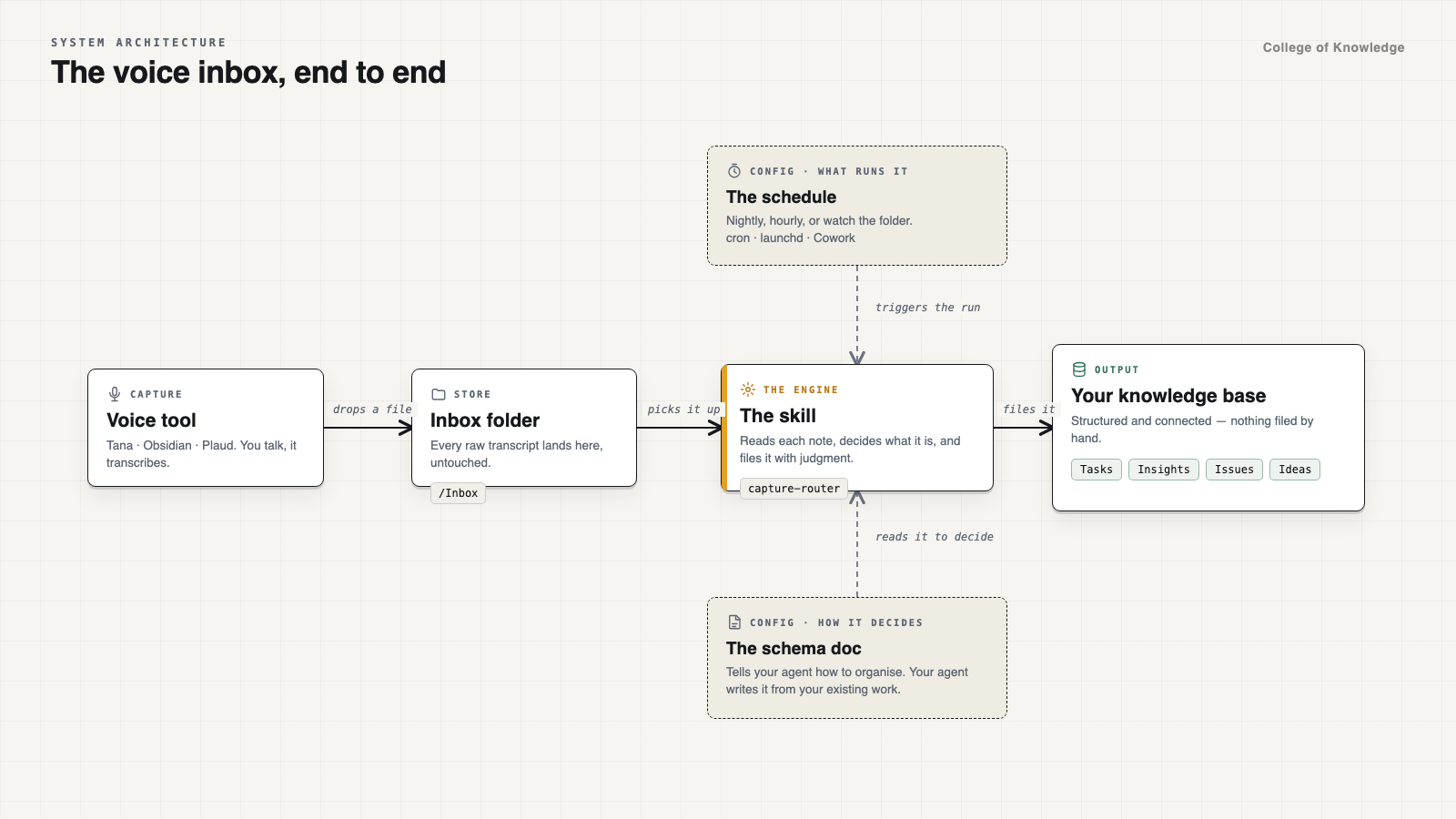
How I Set Up My Second Brain to Organise Itself
At first you might think that a project like this might be complicated. I certainly did when I first started handing over parts of it to organise. But the same pattern worked every time. Teach AI how the system works and where to find your inbox of captures. To be honest I was surprised at how good it was.
Here is how to set up your own self-organising second brain system:
Step 1: Write A Schema Doc
First, you need a document I call the Schema Doc.
This is the document that teaches your agent how your second brain works. It lays out all the types of things you capture (tasks, ideas, project notes, content sparks, tools you want to remember), how your folders or tags are structured, the properties each note needs, and the rules for where each type should go.
Most people think the magic is in dumping all their raw notes into a folder and letting their agent loose on it. It isn’t. Without a schema, asking your agent to organise your notes is like hiring a brand new assistant on Monday morning, pointing at a pile of paper on your desk, and saying “sort this out” without telling them what any of your folders are for. They’ll guess, they’ll invent new categories every time, and within a week your vault will be a bigger mess than if you’d done nothing.
The Schema Doc is what makes this actually work. It becomes the single source of truth when your agent is doing the organising for you. Every time a new note lands, your agent reads the schema first, checks your actual structure, and puts the note in the exact same place you would on your best day.
And don’t worry you don’t have to write this document from scratch either. You can just point your agent at your existing second brain and it will document it all for you.
Paste this straight into your agent:
Look through my second brain and build me a
SCHEMA.mddocument that teaches an agent how my workspace is structured. Document:
- Every folder or area and what belongs inside it.
- Every note type I use (tasks, ideas, projects, content, people, tools, etc.), including the exact properties, tags, or frontmatter each type requires and a real example from my notes.
- How notes link or relate to each other.
- Clear routing rules so an agent reading a raw note from my inbox knows which note type to create, how to format it, and where to put it. Ask me clarifying questions about anything that looks inconsistent before you write the final doc.
Step 2: Build A Simple Capture System
Once your schema exists, you need one dead-simple way to capture your thoughts as they happen.
You can type your captures if you prefer, though I recommend capturing by voice. Talking is the lowest-friction way to get something out of your head while you still have all the context around it.
When I type a quick note, I write three cryptic words like “newsletter idea schema” and then three days later I have no idea what past-me was on about. When I talk for thirty seconds, I naturally say what the idea is, why it matters, and what I want to do with it. That extra context is gold for your agent when it comes time to route the note.
Personally, I built my own voice capture plugin inside Obsidian (yes, I’m geeky like that). I hit one button, talk through whatever is in my head, and my agent dutifully organises it to where it needs to go.
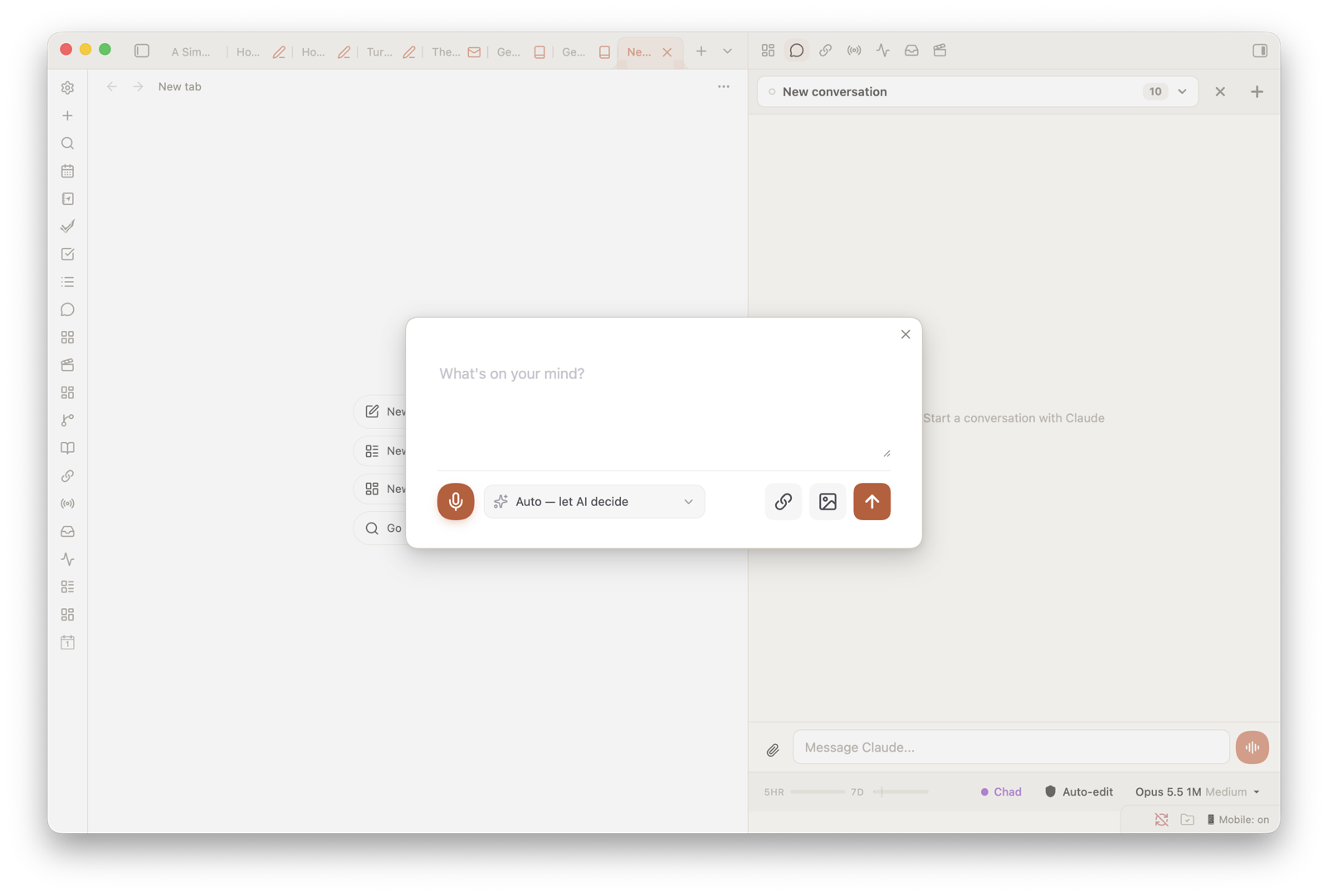
You don’t need to build your own plugin. In fact Obsidian just introduced a native voice capture or if you’re using another tool like Tana it’s already built in.
There are only two rules I have when picking a capture tool:
- It has to be easy to capture everywhere you are. On your desktop while you’re working, and on your phone when you’re out.
- Your agent has to be able to connect to where those captures live. Whether that’s a local markdown folder on your computer or an app with an MCP connection, your agent needs to be able to read the raw captures without you copying and pasting them across.
If those two things are true, you’re good. Pick the one you’ll actually use and move on.
Step 3: Create The Capture Router Skill (And Put It on a Schedule)
The third step is what makes the whole thing self-organising.
And that is a skill for your agent that I call the Capture Router. And don’t worry if you’ve never created a skill before. It’s quite simple once you have the other pieces in place. It just needs to read your inbox folder, and follow the Schema doc to route each item to its correct place.
Sometimes one rambling two-minute voice note has a task, a content idea, and a tool I want to look up later all tangled together. The Capture Router reads the transcript, splits those three things apart, formats each one properly according to the Schema Doc, and puts them into the right places in my second brain.
Once you have a skill, you can turn it into a scheduled run in Claude or ChatGPT and you have a self-organising second brain.
Mine runs every 15 minutes because I do a lot of capture throughout the day, and I like knowing that by the time I finish a cup of tea, whatever I just rambled into my mic is already sitting neatly in my tasks or my content bank.
You don’t need it firing every 15 minutes if you don’t want to. You can set it to run every hour, every four hours, or once a day at 5pm.
There are a few ways you can schedule this depending on how you run your agent:
- Claude Cowork Scheduled Tasks. This is the easiest option because it runs in the cloud, which means your Capture Router still fires even when your laptop is shut.
- A cron job in Claude Code. If you’re already working in Claude Code on your machine, you can set a simple cron schedule to run the skill at whatever interval you like.
- macOS
launchdwithWatchPathsorQueueDirectories. If you want to get fancy on a Mac,WatchPathswill fire the skill the exact moment a new voice note lands in your folder, orQueueDirectorieswill treat your inbox folder like a queue and process files until it’s empty (and if you have no idea what any of that means, just tell your agent to sort it out and it will).
Whichever option you pick, the result is the same. You capture the thought. The schedule fires. Your second brain updates itself in the background.
All the Benefits, Zero Upkeep
I used to think a good second brain meant spending my Sunday afternoons tidying up my notes.
Now I don’t tidy anything. I just talk to my system while I work, and when I open my projects or sit down to write, everything I captured that week is already waiting for me in the right place.
If you’ve got a graveyard of half-built note systems behind you, stop blaming your discipline and hand the upkeep to your agent. Give it a Schema Doc, pick one easy way to capture, and put a Capture Router on a schedule.
Once you build a second brain like this, you will never go back to the old way.
— Ev
PS. Whenever you’re ready to stop maintaining your notes by hand and build an AI system that keeps up with your brain, here are three ways I can help:
- Skip trying to work it out on your own and build this exact self-organising system with my AI Second Brain Toolkit. It’ll walk you through setting up it all up with your AI agent so you can stop maintaining a second brain yourself.
- Change the way you work as a solo operator by building your AI Chief of Staff. The course goes covers how to get your first agent setup, building the context it needs to understand you and 9 pre-built chief of staff skills so you can hand off the daily admin or running your business.
- Or go all in with my membership, The College of Knowledge, where we build your full personal agent operating system together. Ongoing support, monthly workshops, office hours, the full toolkit library, and a community of other solo operators doing it alongside you.

Comments