OFT-97 → You've got AI on every call. Three bots joining your Zooms. Transcripts hitting your inbox. Meeting summaries you never open. And yet somehow you're still losing the good stuff.
Meeting notes tell you what happened in a meeting. But they end up losing the gold worth keeping.
The exact words your client used to describe their pain. That perfect analogy you shared on last Tuesday's coaching call. The specific feature request mentioned at minute 14. The story that landed so well you should be using it everywhere.
All of it — trapped in transcripts you'll never read again.
Here's what's actually happening. Most people treat meetings as isolated events. You show up, you're brilliant, AI takes notes, and then those notes die in a Google Doc or some random folder.
But if you're a coach, consultant, product manager, CEO — anyone who makes their living from their knowledge — your meetings aren't just calendar events.
They're a knowledge engine.
Every call you sit on contains intelligence that could inform your next offer, your next piece of content, your next product decision. But instead of extracting that intelligence, you're getting meeting summaries that tell you things you already know.
Purpose: Discuss Q4 strategy
Attendees: You and three other people
Key points: Some stuff you said
Cool. Incredibly useful. Not.
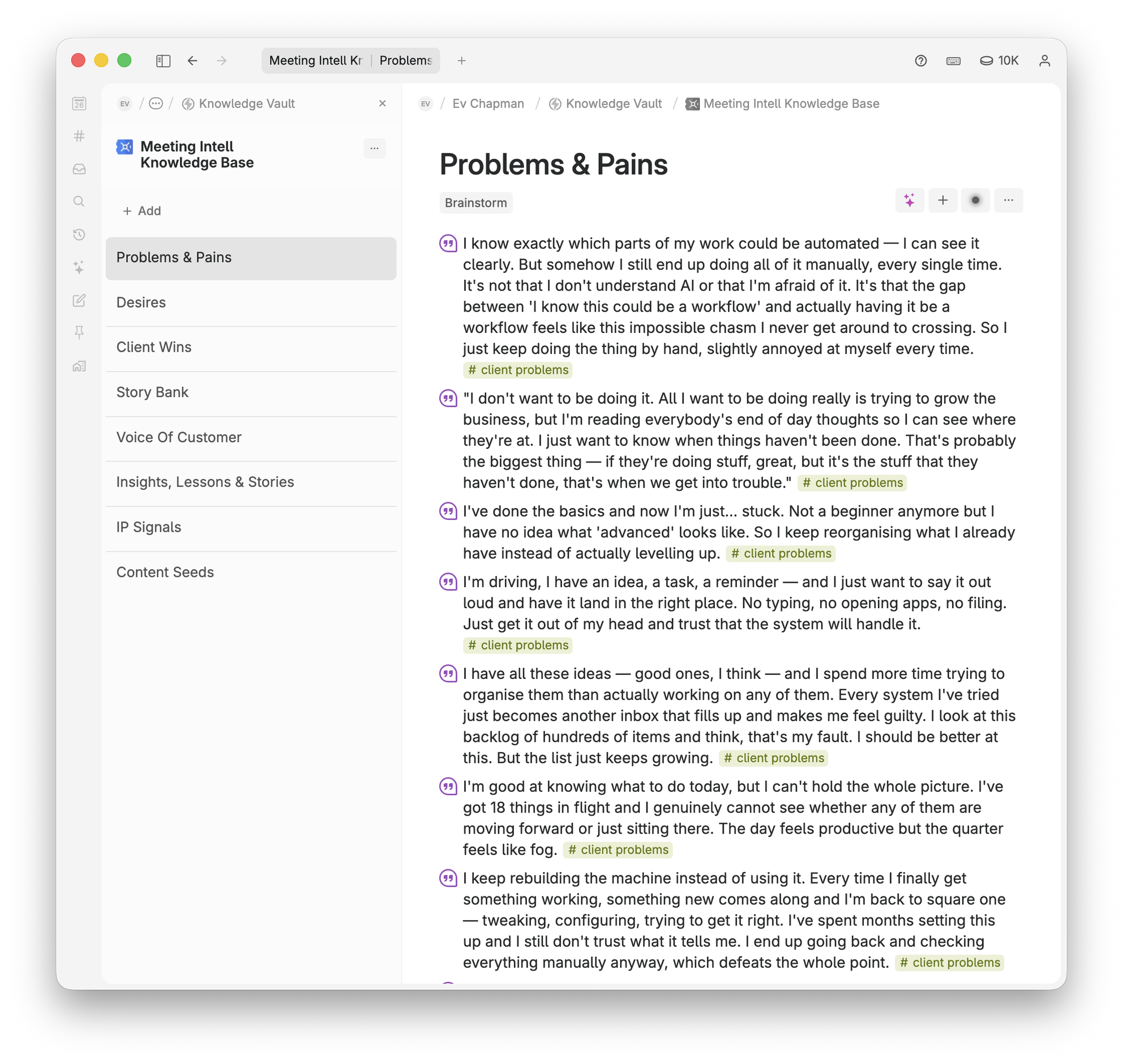
Imagine finishing a client call & clicking one button. Thirty seconds later, you've got:
No manual note-taking. No highlighting transcripts at 11pm. No trying to remember what was said three weeks ago. Just intelligence. Organised. Ready to use.
The toolkit sets up a complete meeting intelligence system inside the agent you already use. There's no new app to learn and nothing to switch to. Whether you work in Claude, ChatGPT, Cowork or Claude Code, the toolkit installs directly into it and teaches it how to turn your meeting transcripts into organised, usable intelligence.
Once it's set up, it runs in the background of how you already work. After a meeting, your agent grabs the transcript and it pulls out all the intelligence and files it straight into your knowledge base.
The toolkit comes with 12 built-in intelligence streams you can extract from meetings, and each one tells your agent a specific kind of thing to look for in a meeting. You pick the streams that matter to your work, and from then on your agent runs them on every transcript automatically.
Pick the individual streams that fit what you do, and run any one of them on demand when you're looking for something specific.
"So how have the last few weeks felt?"
"Honestly? Mixed. The biggest thing is I feel like I'm always behind — every week my content slips. What I really want is for the business to run without me holding every piece of it in my head.
Going in, I'll admit I worried it'd be too complicated to actually keep up with. But since we set up the new system, last month was the first time I hit my target — three posts a week, every week.
Oh — and one thing that would really help: it'd be amazing to see everything from one client in one place. Honestly though, it's been a real turnaround. Going from always feeling behind to hitting every target — I didn't think it'd happen this fast."
Everything your agent extracts gets written straight into your own knowledge base, rather than left in a summary you never read again. On setup you just tell your agent where your knowledge base lives and it saves & organises all the intelligence there for you.
Over time it builds into something you can genuinely work from: you can see the patterns across dozens of meetings, connect what you're hearing to specific products and offers, and actually use your knowledge instead of just storing it.
The toolkit is tool agnostic. You bring your agent (ChatGPT, Claude, Openclaw, Hermes, etc.), your transcription tool & your second brain. The toolkit guide shows your agent how to wire up all your existing systems so you are setup for meeting intelligence in minutes.

You'll be extracting intelligence from your first meeting in about 5 minutes.
All of my courses and templates (including this one) are included inside my new College of Knowledge Membership.
Joining makes a lot of sense — instead of purchasing individually, you'll get access to everything:
So rather than buying this toolkit on its own, get it — and everything else — inside the College of Knowledge from just $47/month.
JOIN COLLEGE OF KNOWLEDGE FROM $47 USD/MONTH →Nope. All 12 streams are pre-built. Your agent runs them automatically — you don't write a thing. And if you want to capture something they don't cover, the Intelligence Stream Builder writes it for you.
Yes. It works with the agent you already use — Claude, ChatGPT, Cowork, Claude Code — and files into the knowledge base you already have — Tana, Notion, Obsidian and more. The onboarding guide connects it all for you.
Use the Prompt Builder agent. Tell it what you want to extract & it writes the prompt for you.
Depends on the meeting length, but usually a minute or two for a full run across your streams.
If you've got a transcript, you can extract from it. Client calls, team meetings, interviews, coaching sessions, sales calls — whatever.
Three things you probably already have: an AI agent you can save skills or prompts into (Claude, ChatGPT, Cowork, Claude Code), a meeting transcript tool (Fathom, Fireflies, Granola, Otter), and a knowledge base (Tana, Notion, Obsidian, Airtable). The onboarding guide connects all three.
Every conversation you have contains knowledge worth keeping. This toolkit makes sure you actually keep it — without the manual work, without losing what matters, without trying to remember what was said three weeks ago. Just show up brilliant & let your system catch the rest.
Extract intelligence from your meetings →Send me a message below and I'll get back to you as soon as I can.
I'll reply as soon as I can.