This Secret Claude Skill Turns Forgotten Bookmarks Into AI Upgrades
Every single day someone shares an incredible AI technique online. A better prompting method. A workflow tip. A system design that makes you think “I should try that.”
And every single day you are probably saving things into a bookmark folder and never looking at it again (am I wrong?)
The information isn’t the problem. The problem is processing it. When you’ve got 127 saved posts staring at you, working out what’s worth implementing and actually doing it feels like a full weekend project. So you don’t.
I got sick of this cycle so I built a Claude Skill called Idea → Action that goes through everything I’ve saved, reads the content and decides what should be upgrade in our AI systems → and then upgrades itself.
Since using it my AI workflows have been getting better every week because we run this skill.
Want to see it in action? Watch the full walkthrough:
PSA: Stop Saving Bookmarks On Platforms
I know it’s incredibly convenient to hit the bookmark platform on a platform and move on. But let’s be serious - how many times are you going back to look at them. I’m going to hazard a guess 0.0% of people actually do.
Here’s what I suggest. Stop saving on platform and create a central place you can save these bookmarks to. I personally have a tag in Tana called System upgrade and a simple IOS shortcut I can send them to.
But you could set this same thing up in Notion, Obsidian, Apple Notes, Evernote. Whatever. Just as long as it’s somewhere AI can access.
My IOS System Upgrade Shortcut
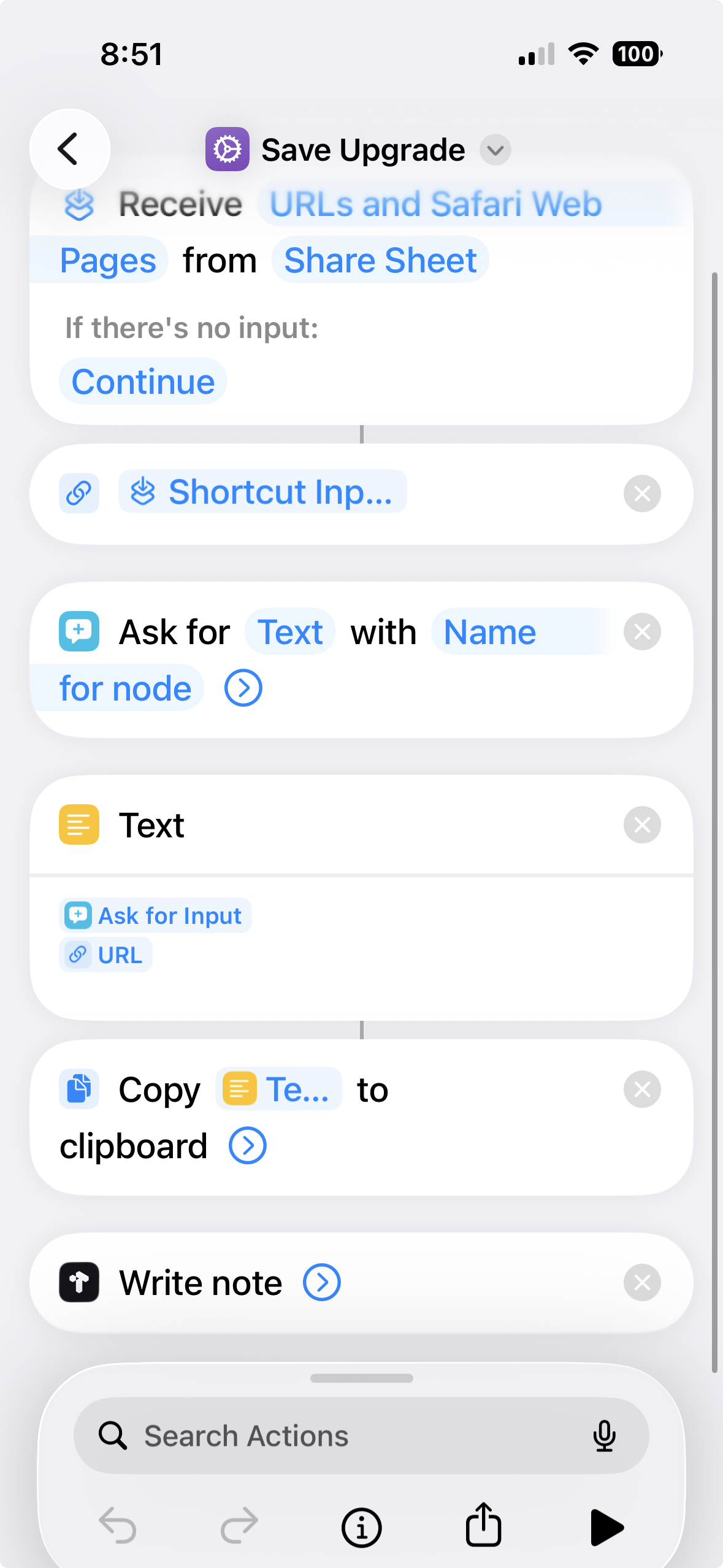
I personally built an IOS Shortcut that makes this super easy to save bookmarks into Tana. It takes a URL (so I can use it on any social media platform or website) and then asks me for a quick note and then compiles it and uses the Tana Shortcut to add it to Tana directly.
I personally LOVE this workflow because I always have a note about why I thought this was worth saving. Which helps if we’re going through this two months later.
Here is what my IOS Shortcut setup looks like:
The Skill: Weekly Triage That Upgrades Itself
Once everything is all in one place now Claude can go to work on the bookmarks. And this is truly magic. Once a week I tell Claude it’s time to run Idea → Action. The skill does three things:
- It pulls everything I saved. Using search queries, it finds every item tagged as System Upgrade from the past week.
- It reads the actual content. It doesn’t just look at my note. It grabs the full tweet, reads the thread, downloads YouTube transcripts, pulls LinkedIn articles.
- It categorises into a report. Quick wins (easy upgrades I can make right now), bigger builds (weekend projects that need planning), already covered (I’ve already built this), not relevant (doesn’t apply to my workflow).
The triage takes about 10 minutes in total (I go grab a drink while it’s running). Then I pick what to implement from the report.
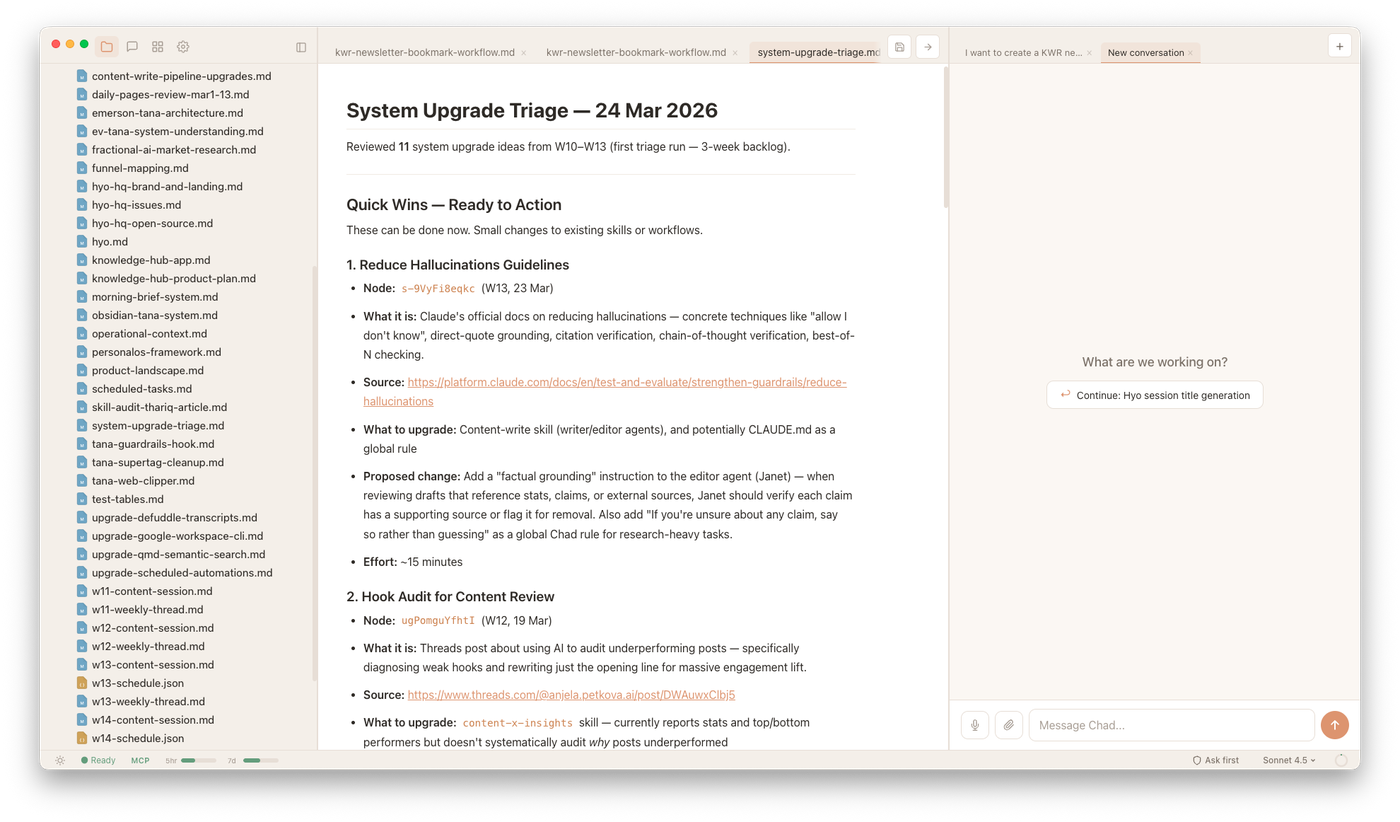
Most of the quick wins I just run straight away in that session. Bigger builds we plan together how to implement and then create tasks in Tana so that I can schedule time in to work on them.
What I like about this is that I’m not constantly tinkering with my systems. I have one time a week I can do upgrades and then actually schedule time in for anything else that’s going to need time.
And the best thing is you don’t just have to use this skill for AI workflow upgrades. It could work for anything that you are saving - interesting posts about business, personal growth, gardening. Whatever you are into you can tweak the skill to suit.
→ Click here to download the skill and start using it.
PS. If you want to get more out of your AI systems I’ve got two new things I’m launching that might help:
- I’m building a course called Build Your Personal AI Operating System — where we go beyond prompting chatbots and build an all-in-one AI system that can actually operate and support you in your business & work. Founding members get early access and early pricing. So join the waitlist to be first in line.
- Last week I hosted a workshop called Think With AI where I showed my exact system for working alongside AI every day to get REAL work done. If you weren’t able to make it in person - I have made it available as an evergreen workshop.

Comments