What an AI Agent Actually Is (And How to Build Your First One in Claude)
AI agents have become one of those things everyone on the internet seems to be talking about lately.
Every week there’s a new platform promising a team of digital employees who will run your entire business while you sleep.
Hermes. OpenClaw. Grokbot. A small army of bots with corporate job titles.
Meanwhile, most people I speak to in the real world are still trying to work out:
What actually is an agent? And how is it different to what I’m already doing in ChatGPT or Claude?
And it’s a shame. Because agents can really change the way you work, especially if you work on your own. And it’s really not as complicated as the gurus want to make you believe.
So, the TLDR is… A chatbot answers. An agent acts.
A chatbot can draft your customer service email for you.
An agent can read the incoming email, check the customer’s account, give them access to the course they purchased and send the reply (without you needing to be in the process).
That’s an actual thing my agent did last week. I was on the way to the hairdresser, which is an hour across the city. I got a notification that someone couldn’t access a course they had purchased. I just spoke to my agent in Claude and the whole thing was sorted in 2 minutes. While I was still driving.
That ability to operate is what changes everything.
Especially when you’re a solo operator.
When you work alone, you are the person making the decisions AND pressing every button. There is no team to hand the work to.
An agent gives you somewhere to hand it.
You can stay responsible for the direction, ideas and final decisions while your agent handles more of the operating underneath them.
And the good news is you don’t need to move your entire life into a new agent platform to make this happen.
You can build your first agent inside Claude or ChatGPT using the Agent OS system I’m about to show you.
The Agent OS System
I’ve spent the past year building this system inside my own solo business and teaching hundreds of people how to do the same. I call it Agent OS because when you start to think of AI as an operating system you work within… everything changes.
The AgentOS system gives your agent the knowledge, access and methods it needs to do useful work alongside you in your business.
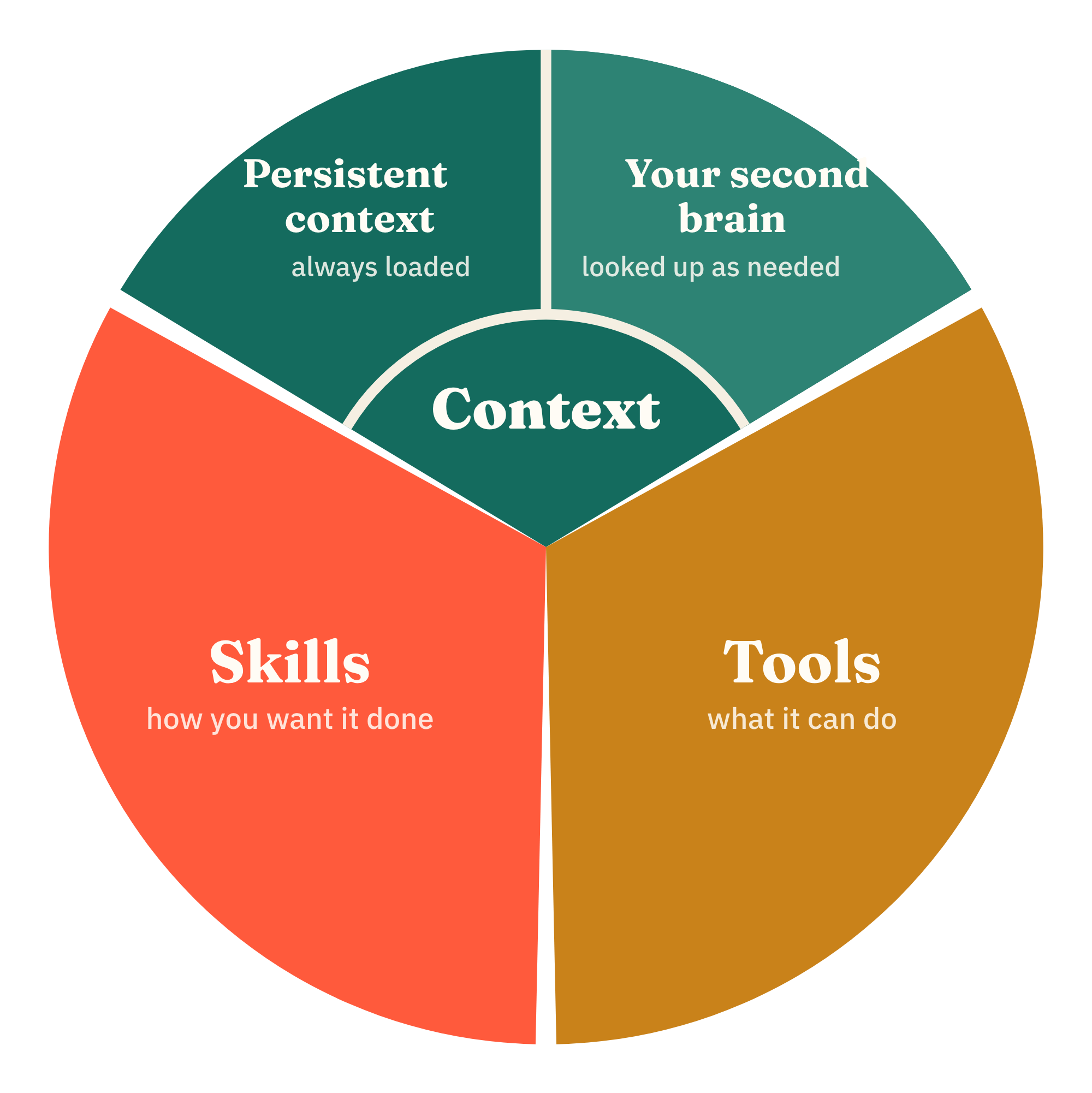
1. Context: Give your agent something to think with
Every chatbot conversation begins at zero.
Apart from a few generalised memories, it doesn’t know who you are, what you’re building, how your business works or what happened in your last conversation.
So your first message usually becomes a miniature onboarding:
Here’s what we’re doing. Here’s the background. Here’s what I’ve already tried… (times that by 25 conversations a day!)
The way to solve this is to give AI its own context BEFORE you begin the conversation. Which lands in two ways:
Layer one: The operating context
This is the information your agent should load every single time you work together.
It includes:
- Who you are
- What your business does
- How you prefer to work
- How your Agent OS is organised
- How you want the agent to behave
- Where it should look for more information
This normally lives in a CLAUDE.md or AGENTS.md file inside your Agent OS folder (more on the one folder system further down)
This file gets loaded at the start of every single conversation. So you want to include everything relevant that your agent needs to get up to speed fast.
If you need help creating the personal part of this context, use my free Personal Context Profile Prompt. It takes a few minutes answering a few questions and your whole context doc gets created.
Layer two: Working context
The second layer of context you’ll want your agent to have access to is your second brain. The operating context is the stuff that doesn’t change often. Your second brain is all the up to date context of your work (or life):
- People
- Meetings
- Projects
- Tasks
- Ideas
- Decisions
- Current priorities
Think of it as all the externalised knowledge of your business. I tell people often: AI isn’t a mind reader. So if you want to stop explaining yourself constantly, invest in a second brain.
You might have a second brain already. But if you don’t, start with my free Second Brain Starter Kit. You hand it to your agent, it reads your work and pulls everything current into a second brain structure that can act as context for your agent.
2. Tools: Get your agent on the tools
Context makes your agent useful. Tools mean it can act.
Connecting my tools to Claude is when things really changed how I operate as a solo business owner.
Sure, drafting an email is nice. But having AI take care of all the fiddly stuff around scheduling my emails in Kit… that is where the real time suck goes.
- Copying into a new draft
- Creating the broadcast
- Formatting
- Checking the audience
- Testing the preview
And AI is now connected into every tool in my business: Email, Calendar, Stripe, Kit, Tella video editing, Fathom meeting recorder, social media scheduling, etc.
Now I can draft a newsletter with my agent, ask it to upload the post to my website and have it create the email inside Kit. I still review everything and make the final decision to send, but I’m no longer responsible for all the operating in between.
That is the advantage for a solo operator.
And I already know what you are thinking… what if AI blows up all my emails? I know, because I felt the same. So start small and let AI build your trust:
- Read only access. Let your agent find emails, review calendar events, retrieve customer details or read information from your business systems.
- Non destructive actions. Create drafts, prepare or update information, but never delete anything.
- YOLO access. Once you start to trust it and you see how much more productive you can be, you can go all in and give it access to everything.
3. Skills: Get the workflows out of your head
Most solo businesses run on knowledge that has never been written down.
- You know how to onboard a client.
- You know what needs to happen after a coaching call.
- You know how you turn an idea into a newsletter, publish it to your website and prepare the email.
You work on autopilot because you have done it a million times. But bringing an agent into your business is exactly like employing a new human. You have to teach them how you do things.
That is what agent skills are for. They live inside the Agent OS and whenever your agent needs to do something it looks to see if there is a skill for it. It’s exactly why my agent knows how to upload emails into Kit and schedule them, and why I trust it to do it. Because we have a skill that it follows.
Think about a skill kind of like an SOP. It packages everything your agent needs to run a repeatable workflow:
- The goal of the workflow
- When the skill should be used
- The steps it should follow
- The tools it needs
- The reference material it should read
- The checks it should perform
- Where human review is required
- What the finished output should look like
And the good news here is that you do not have to sit down and document your entire business with SOPs (nobody has time for that). Instead I use a method called The Codify Method, where you teach your agent how to do something while you are doing it and then IT writes the skill for itself.
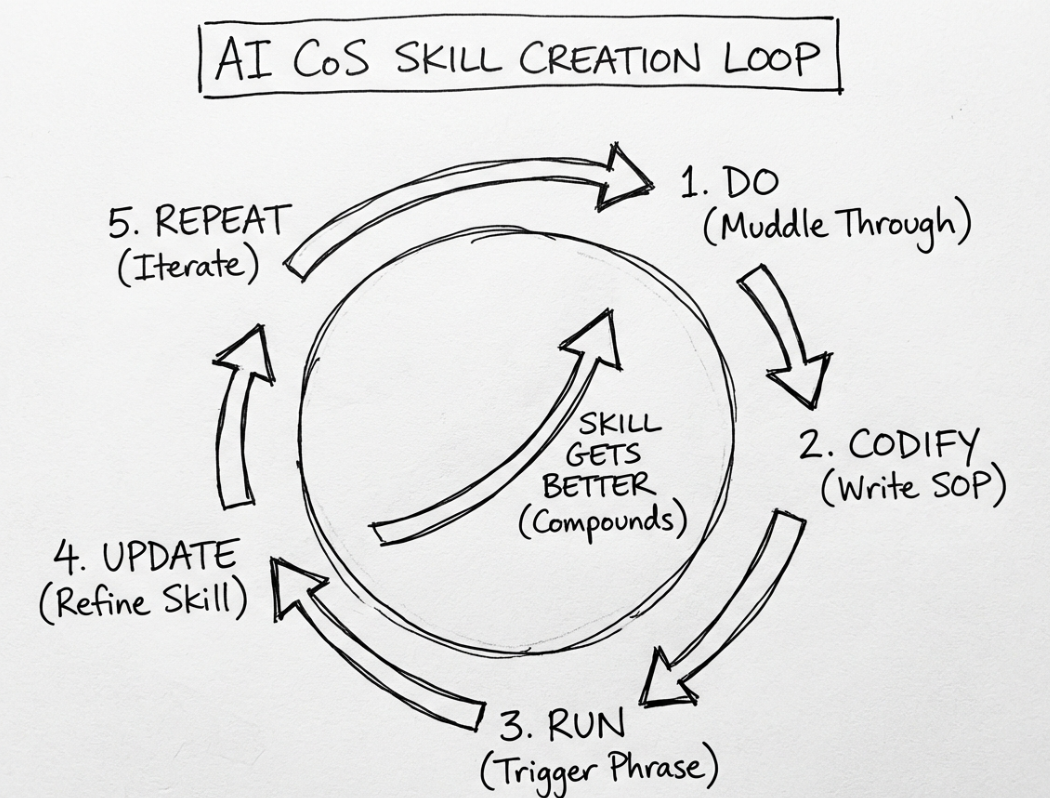
- Do the workflow with your agent. Open a new chat and just do the work as usual.
- Codify. At the end, ask it to create a skill from what you just did together so you can run it again later.
- Use the skill. Next time you do that workflow, it runs the skill.
- Iterate. Just like training someone, it will take a few runs for it to get right. As it runs the skill again, correct it where it went wrong and ask it to update the skill.
This is how I’ve spent the past year turning every workflow in my business into a skill my agent can run. I direct, my agent acts. I could not run a solo business at the level I do without any staff if I didn’t have an agent who can handle so much.
How many agents do you actually need?
Spend five minutes in the AI corner of the internet and you’ll find someone managing a digital company of 47 agents.
There’s a research agent. A marketing agent. A content agent. A finance agent. Presumably one agent whose full-time job is managing the other agents.
Ignore all of that. You do not need multiple agents. When you understand that an agent is just a combination of context, tools and skills, there is no really good reason to have more than one.
One agent does the same kind of work as 47 agents. Except when you have one, you don’t have to decide which one to talk to, you don’t have to worry about what context it has or doesn’t have, and you only have to manage one.
So I suggest everyone sets up one agent… Their Chief of Staff agent.
One agent. One Agent OS folder.
So how do you actually set up an agent? Firstly, ditch all those projects you have set up in Claude or ChatGPT that are doing one thing each (you can migrate them into one system).
What you want to do instead is set up a folder on your computer called Agent-OS. This is essentially the operating system for your agent. Inside will live:
- The agent’s operating instructions (claude.md or agents.md)
- Context files about me and my business
- Skills
- Memory and logs
- System documentation
- Ongoing project threads
Why a folder and not the built in projects inside Claude or ChatGPT? It’s simple. Having a one folder system means you can switch between platforms. If Claude is playing up, you can just open the folder in ChatGPT (or whatever platform you want). You own your setup instead of being locked into a platform.
And all those projects you had? One for marketing, one for writing newsletters or drafting emails? Ask your new agent to turn those into skills instead.
Once you have your one folder set up, just go into Claude (Cowork) or ChatGPT (Work) and open the folder to start chatting with your agent. Every conversation happens in this folder now.
And if you want the folder built for you, grab my free Agent OS Starter Kit. It’s a prompt you hand to Claude or ChatGPT and it creates the whole structure for you — the folder, your operating instructions and the first few skills to get you going.
The valuable part isn’t the model.
It’s the context, tools and skills I’ve built around it.
And that is what an agent actually is in practice.
Not a mysterious new category of AI you need to learn from scratch.
It is one AI, inside a system, that knows your work and can increasingly operate alongside you.
And for a solo operator, that changes everything.
— Ev
PS. Whenever you’re ready to build the agent that operates with you, here are three ways I can help:
- Change the way you work as a solo operator by building your AI Chief of Staff agent. The chief of staff course goes in depth into your agent OS folder + the pre-built CoS skills to get you started.
- Start building your second brain with the AI Second Brain Toolkit. A toolkit that you hand to your AI agent and have it pull all your raw knowledge into an organised second brain you can use for that context layer so you never explain yourself again.
- Or go all in with my membership, The College of Knowledge, where we build your full personal agent operating system together. Ongoing support, monthly workshops, office hours, toolkits and a community of other solo operators doing it alongside you.

Comments