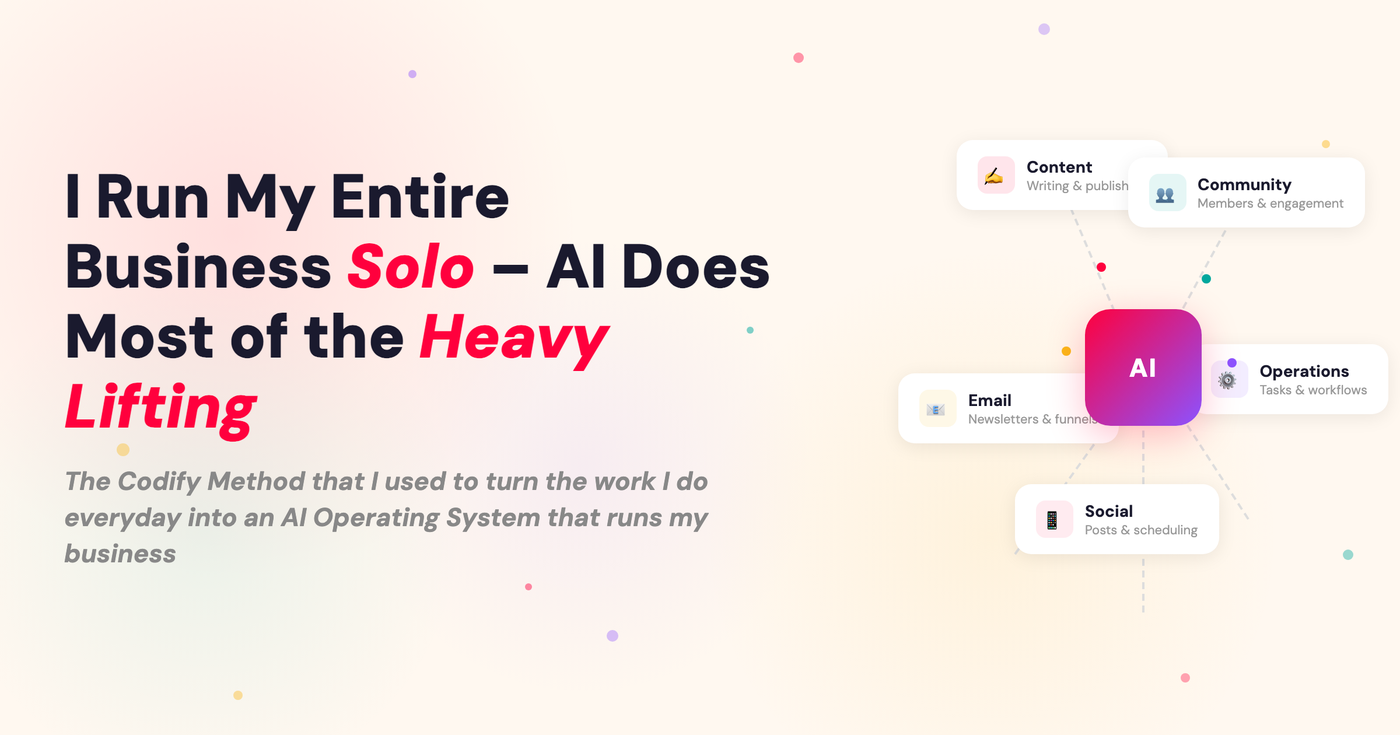
I Run My Entire Business Solo – AI Does Most of the Heavy Lifting
Here’s something I think about a lot.
No matter how well I manage my time, no matter how good my calendar looks or how tight my task list is, I still end the week feeling behind in some way.
And I’ve realised it’s not a time management problem. It’s a capacity problem.
And every solo operator has the same problem.
There is always more to do than hours in the day. There are always more ideas than bandwidth to execute them. And if you’re running a solo business, you’re in every single role — strategy, delivery, content, operations, client work, admin.
All of it, all the time.
And as much as I love running my business solo - there is still a ceiling and most of us hit it constantly.
The butchers paper org chart on my wall
So about six months ago I started to think about how I could bring AI into my business not just for a few tasks - but for like 80% of the work I do everyday.
Not in a ‘I’m going to sit on a hammock and do nothing all day’ way. But in a way that actually made it easier for me to work in my genius while AI handled all of the stuff that was taking up my headspace.
→ The overdue payments & reminders check for my membership
→ Managing my inbox & communications
→ Posting office hours replays to my community
→ Keeping my website up to date
→ Posting social media posts (not writing them, actually scheduling them)
→ Uploading & Scheduling emails
→ Getting lead magnets live (connecting to Kit, building the landing page, creating the delivery sequence.
→ Creating slides for workshops
And some of the bigger things I do on a weekly basis:
→ Working with me to write my Youtube scripts
→ Brainstorming & organising workshops for my community
→ Turning workshops into step by step toolkits for my community.
→ Checking in on the business stats each week to make sure we are on track.
→ Managing project reports & kick-offs for clients.
This isn’t a pipe dream - every one of the workflows above AI either does the workflow or is part of the workflow. My Chief of Staff Chad is my right hand man now and is in almost every area of the business in some capacity.
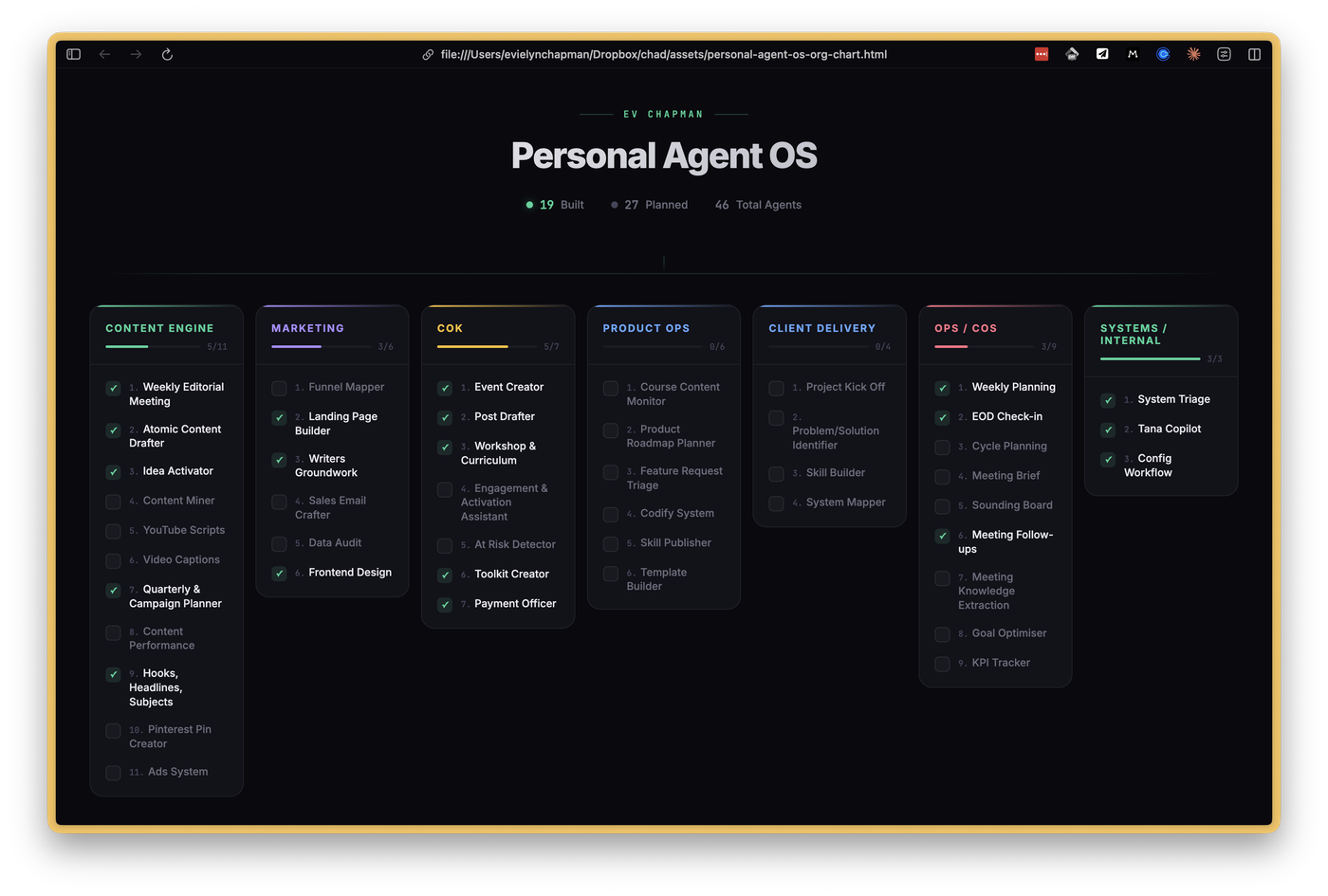
And it all started with a piece of butchers paper tapped to my office wall that has now affectionally been named The Org Chart method.
One day when I was super overwhelmed I decided to map out my entire business and everything I did. I pulled out some butchers paper and listed all the roles along the top.
Under each role I started to list all the workflows I did repeatedly. That was the start of my AI system.
Every week since then I have picked a few workflows to train AI on using my Codify method.
I still have the map on my wall now (& an interactive version that AI made for me).
Turning workflows into Claude skills
Each of the workflows listed becomes a Skill in your system. Skills are one of the foundations of building an AI Operating System. Each skill you create gives your AI another level of capability. Think of them like SOPs for AI - except you don’t spend a week sitting down and writing them yourself.
Most people don’t realise you can actually create your own skills. And more importantly the Claude is actually the BEST at writing it’s own skills.
I created the codify method because I don’t have time to sit down and write every skill myself. Using this method I’ve build over 40 Claude Skills into my OS while just doing my normal everyday work (& making Claude do the heavy lifting).
The CODIFY Skill-Building Loop
I think about building my AI Operating System the same way I would train someone new on staff. We do the work together, they learn, we do it again, I give feedback. And after a few turns thy are good to go off and do it on their own.
Here is how the loop works
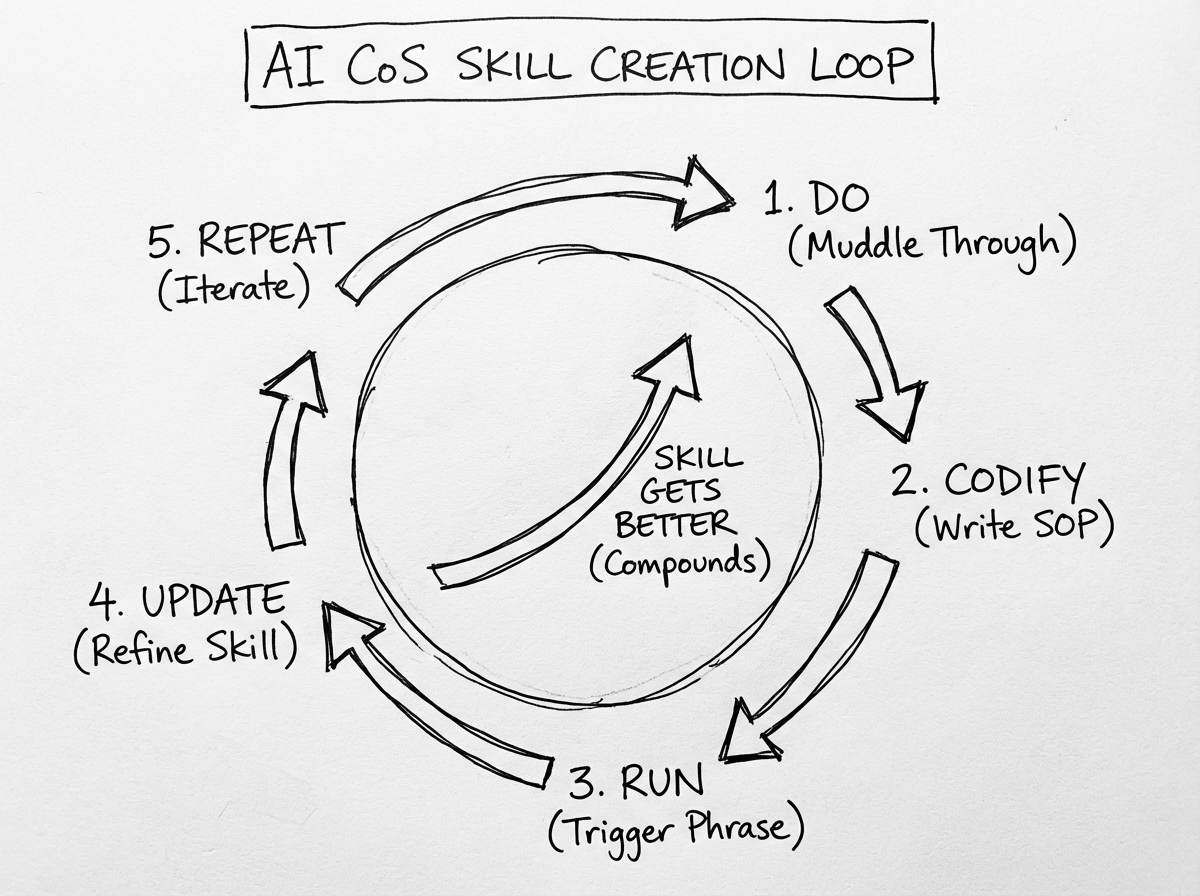
Do The Work → Codify The Skill
When I want to codify a workflow, I just tell Chad at the beginning of a session with a prompt like this:
We are going to codify this workflow. Let’s go through the workflow together and then at the end turn this into a skill in your system
Then we just do the work. This is what I mean by I don’t stop what I’m doing to create this system or write SOP’s myself. AI is actually great at pattern recognition and writing it’s own skills.
So we just do the work and then at the end Chad turns it into a skill.
(by the way skills are just repeatable workflows that AI can run on command. Building skills is one of the highest leverage things you can do with your AI system apart from building out context so it knows who you are)
Run The Skill → Self Learning Loop
Next time that workflow comes up, you trigger the skill.
AI already knows the structure. It knows the context. It knows your preferences from the first time. You’re not starting from scratch. AI knows exactly what to do.
You just open the session and start.
Now the first couple of times you run this loop it’s not going to run perfectly. The same as when a real person runs something for the first time. It’s a little bit messy.
The key here is not to throw in the towel, or get annoyed. It’s to be patient and give feedback.
I remember when I was building my weekly planning skill. It probably took a good 3-4 runs before I felt it was really dialled in.
The key here is at the end of each run of that skill ask AI to go back through the conversation and update the skill with what it learned and any feedback you have.
The more you do that, the better the skills actually get.
I have about 40 skills now across content, operations, community, and product. I build two or three a week, just by doing the work that was already on my list. It doesn’t feel like a project. It feels like a side effect of working.
What it looks like to actually work with AI as an operating partner
I want to address something that you might be thinking: this isn’t about handing your business to AI. That’s not what I’m building here.
What I am building is a system that ENABLES my best work. And that comes down to the two kinds of skills that I build in the system:
The first are autonomous Skills — things that just run without me.
These are for things that I genuinely don’t need to be in the loop on:
Every week, AI grabs the replay from my community office hours, writes the post, and publishes it. I’m not in the process at all. Don’t need to be. And when I was I actually hardly ever did it!
There’s also things like checking payments in Slack and firing off reminders — fiddly stuff that used to sit on my to-do list making me vaguely anxious. Now it just happens.
That’s the stuff a CEO of a solo business genuinely shouldn’t be doing herself.
The second — and honestly the ones I find most powerful — are collaborative Skills. Where AI runs the workflow with me.
These are best for the big workflows that require heavy lifting. In my world that is things like - writing YouTube scripts, developing workshops for my community, planning new content and courses.
All of these things need my genius, my judgement and my taste (because I care about what I produce and am not handing that off to AI). But it’s also the stuff I used to procrastinate on constantly.
So in these workflows - AI runs me. Chad (my main AI man) runs the whole workflow. All I have to say is let’s brainstorm the next workshop or script the next video and the process gets kicked off without me having to think about what to do next.
→ Chad asks me to brain dump everything I’m thinking.
→ He goes into my notes and collects all of my thinking on the topic
→ He comes back to me with a proposed outline
→ We iterate together on it until I’m happy
→ Chad sends it off to Gamma to create the slides
What used to take me forever — because honestly I’d just sit there staring at the blank document — now I just say: let’s start a Workshop. And AI leads me through it.
Here’s what I didn’t expect: when there’s a workflow waiting for you — one that knows the process, knows your standards, knows what good looks like for you — starting is easy. You just show up in your genius and AI handles the rest.
That’s the real shift. Not that AI is doing everything. It’s that AI is running the hard parts with you — so the stuff that actually needs your brain gets your best brain.
It all started with an org chart exercise, a big piece of paper, and a method that made it easy to train AI.
You already do the work.
The Codify Method just turns that work into a system – one workflow at a time.
The Codify Your Work Toolkit
This week I’m launching the Codify Your Work Toolkit I built for exactly this process. It has everything you need to start codifying your own work (without the trial and error I had to do for 6 months):
- The full Org Chart Method prompt that helps you brainstorm every role and workflow in your business, then builds you an interactive map you can tick off as you build each skill.
- The Codify Session skill, a skill I built so your AI knows exactly what a codify session is and how to turn that into a repeatable, well built skill.
- The Self-Learning Loop skill, another skill I built to put your AI Assistant into a self-learning loop so your skills get better each time you run them.
- Bonus: the Knowledge to Skill skill, which turns anything you find on the internet (a post, a podcast, even a full course) into a working skill in your own system
It’s $33, and honestly the best way I know to start turning the work you do everyday into an actual AI system for your business.
Get the Codify Your Work Toolkit →
— Ev
PS If you want to go all in on building a solo business with AI as your operating partner, here are couple of ways I can help…
- Turn AI into the best employee you will ever hire - your Chief of Staff. Imagine waking up each morning and your inbox is organised, your day is prepped, you have notes on all the meetings you have for the day… that is what we build in the Chief of Staff Course. The support you need to do your best work.
- And if you want to go all in with a bunch of other solo operators building their AI Operating Systems then check out my College of Knowledge Community. Every month get access to toolkits, systems, workshops & resources to help you build your business with AI.

Comments