The AI Tool That Most Business Owners Are Ignoring Right Now
There’s an AI tool most business owners are ignoring. And it might be the most powerful one out there if you’re running a business.
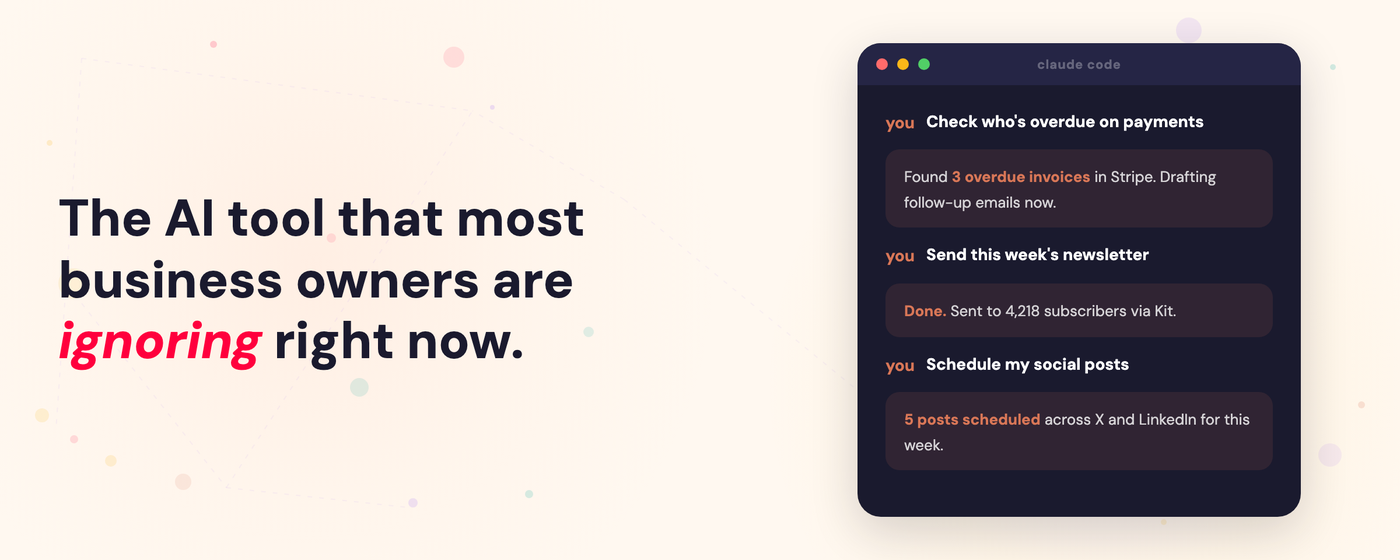
If you’re a solo operator or a small team, you know the reality. You’re the strategist, the marketer, the admin, the community manager, the bookkeeper, the content creator + all the other things in your business. You’re doing all the things, all the time — and there aren’t enough hours to do any of them as well as you’d like.
And the promise is that AI can help us with this. And it does — a bit. The chatbots are great for brainstorming and drafting. But they can’t actually DO anything in your business. They can’t send your newsletter. They can’t check your Stripe for new customers. They can’t pull your notes together and build a workshop outline.
Everything they produce stays in a chat window until you manually move it somewhere useful.
But there’s a tool that closes that gap. And it’s called Claude Code.
I know what you’re thinking already - that’s just for developers and vibe coders! I know because I ignored it for months too thinking the same thing.
But I’m convinced now they should call it Claude Agent, because that’s what it actually is. A powerful AI chatbot that can actually DO things for you, not just chat.
I started using it two months ago and realised the gap between “AI that talks about your business with you” and “AI that actually operates inside your business” is enormous.
Here’s what makes it truly worth looking into if you’re a solo operator and want AI to actually be a true operational partner in your business:
Tools That Actually Do Things
This was quite possibly the biggest unlock for me. Claude Code can connect to the tools you use every day — and actually do things inside them.
Claude Code can connect to almost any tool you use through something called MCP (basically ready made connections to app). But it can also connect directly with just an API Key (& most apps have some kind of API). And you don’t even really need to know how to do it. I just ask Claude - can we connect to Kit? And it checks if there is an API and hooks it up.
I’ve connected almost all of the tools I use everyday: Stripe, Kit (my email platform), Circle (my community), Postiz (social media scheduler), Tana (my knowledge base), Google Calendar, Gmail, and more.
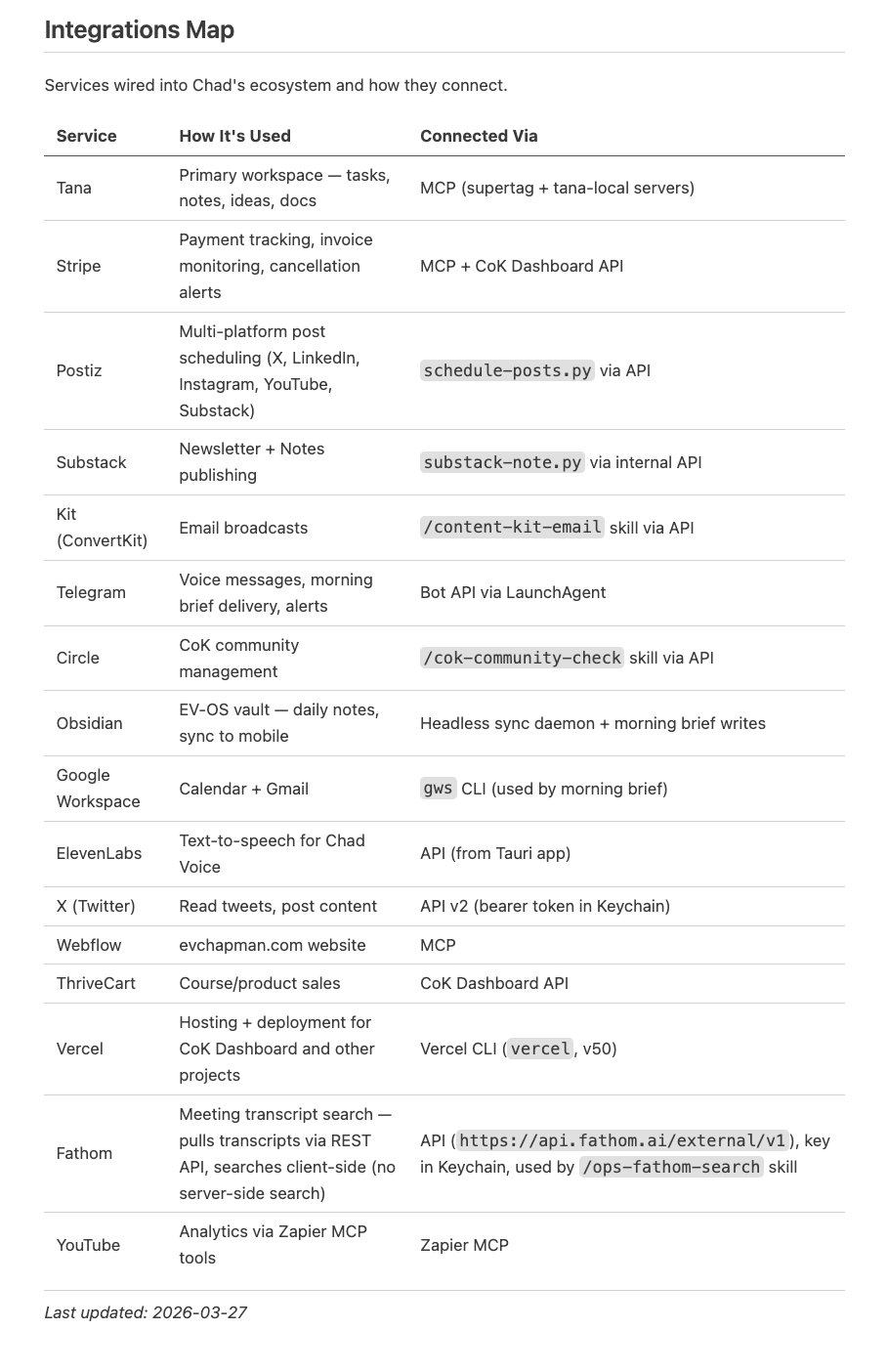
Once they are hooked up all I have to do is ask Claude to do things for me:
- I ask Claude to create an appointment in my Google Calendar.
- I write my newsletters with Claude and when we’re ready it connects to Kit, uploads the email directly, and schedules it.
- I have it check emails, draft replies, and organise my inbox.
- I check if there are any posts I need to reply to in my Circle Community.
- I ask it to check Stripe for missed & overdue payments
I basically work from conversations now without having to log in to any tools. This saves me a bunch of time. But it gets even better when you add automation…
Automation: Workflows That Run Without You
Tools let Claude do things when you ask. Automation takes it further — Claude can actually build workflows that run on their own.
Think of it like Zapier, but without the exorbitant costs or hours of complicated setup. You describe what you want and Claude Code… builds it.
Here’s an example:
Every week I do a payments check for my community, College of Knowledge. Before I set this up with Claude the workflow looked like this:
- Check Thrivecart for any cancellations.
- Check Stripe for missed payments
- Draft emails for any missed payments
- Update circle access for cancellations.
It was a painful process 😧
Here’s how I automated it with Claude Code:
- Claude has access to Stripe, Thrivecart, Gmail & Circle.
- Every Monday it checks for missed payments & cancellations & sends me a report
- It drafts missed payment emails, finds the stripe payment link and insert it into the email and uploads those drafts to gmail.
- I approve the cancellations and it goes into circle and makes changes to their access.
It takes me less than 5 minutes compared to over 30 minutes before.
And it was not hard to setup at all. Claude did all the work.
I have automations like this for everything now:
- A morning brief that pulls my calendar, tasks, emails that need replying & a sales snapshot and messages me.
- Every Sunday I get a report on my marketing for the week, social media performance, email list growth, etc.
- Everyday Claude checks for what social media posts needs to go out and schedules them.
This is where the “code” part actually comes in. Because Claude Code can code, it creates these workflows by writing the scripts itself. I didn’t build any of them. I described what I wanted and Claude Code built them.
All those things you always wished you could do… Claude can make them happen.
Skills: Repeatable Playbooks
Skills in the normal Claude are great. But Skills in Claude Code take it to another level. They’re not just “here’s how to do something.” They can call tools, run scripts, and actually execute workflows on your computer.
The theme here is this: Claude is fine for thinking. Claude Code can actually OPERATE for you. And that is everything if you’re a busy business owner with limited time.
Plus — Claude Code writes and updates its own skills. You just tell it “create a repeatable skill for this task” and it does.
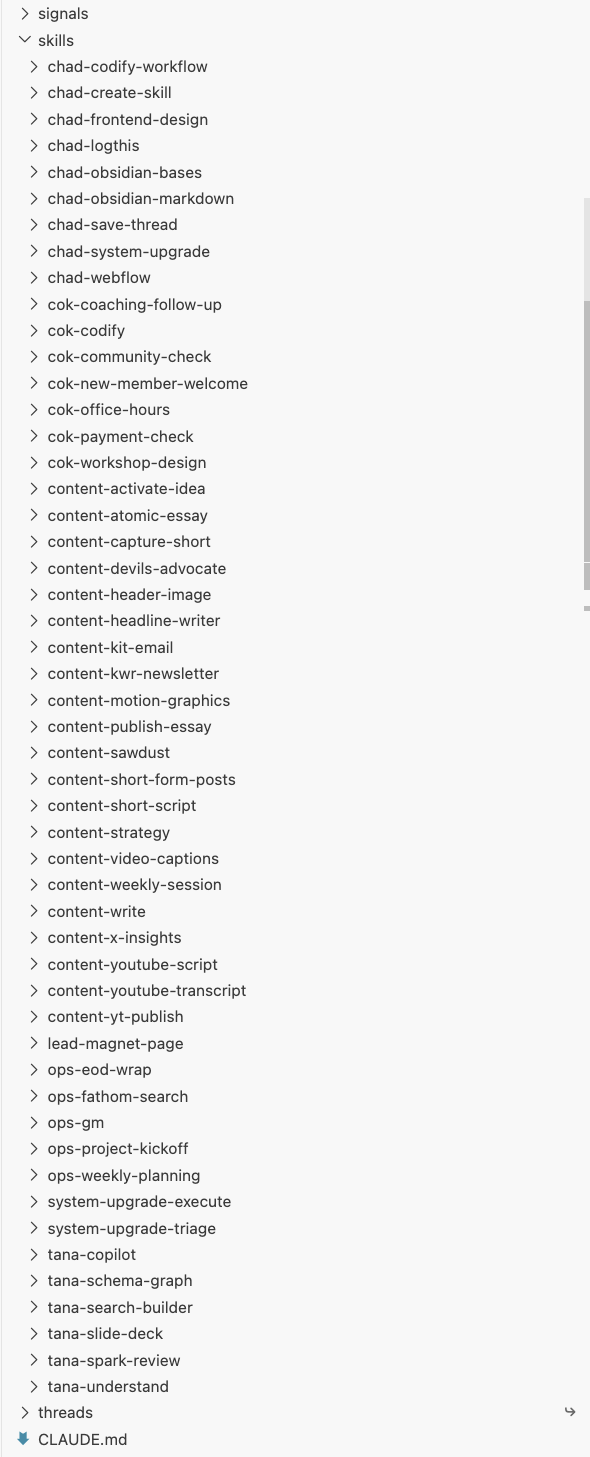
I’m nearing 50+ skills for different things I do in my business. Every one of them was built the same way:
- I say to Claude “we’re going to do a workflow.” We work through it together.
- At the end I say “turn this into a skill.”
That’s it. Now it runs the same way every time without me explaining anything again.
One Interconnected System
Heres the difference - when I use Claude Code I feel like I’m working in one interconnected system. Claude desktop always felt disconnected to me. I had a lot of projects setup for different kind of work, but I had to navigate to that project and start a conversation. Projects didn’t connect with each other.
But when I use Claude Code I just open up a chat and everything is available for me - all the tools, skills, automations, memory, files, folders.
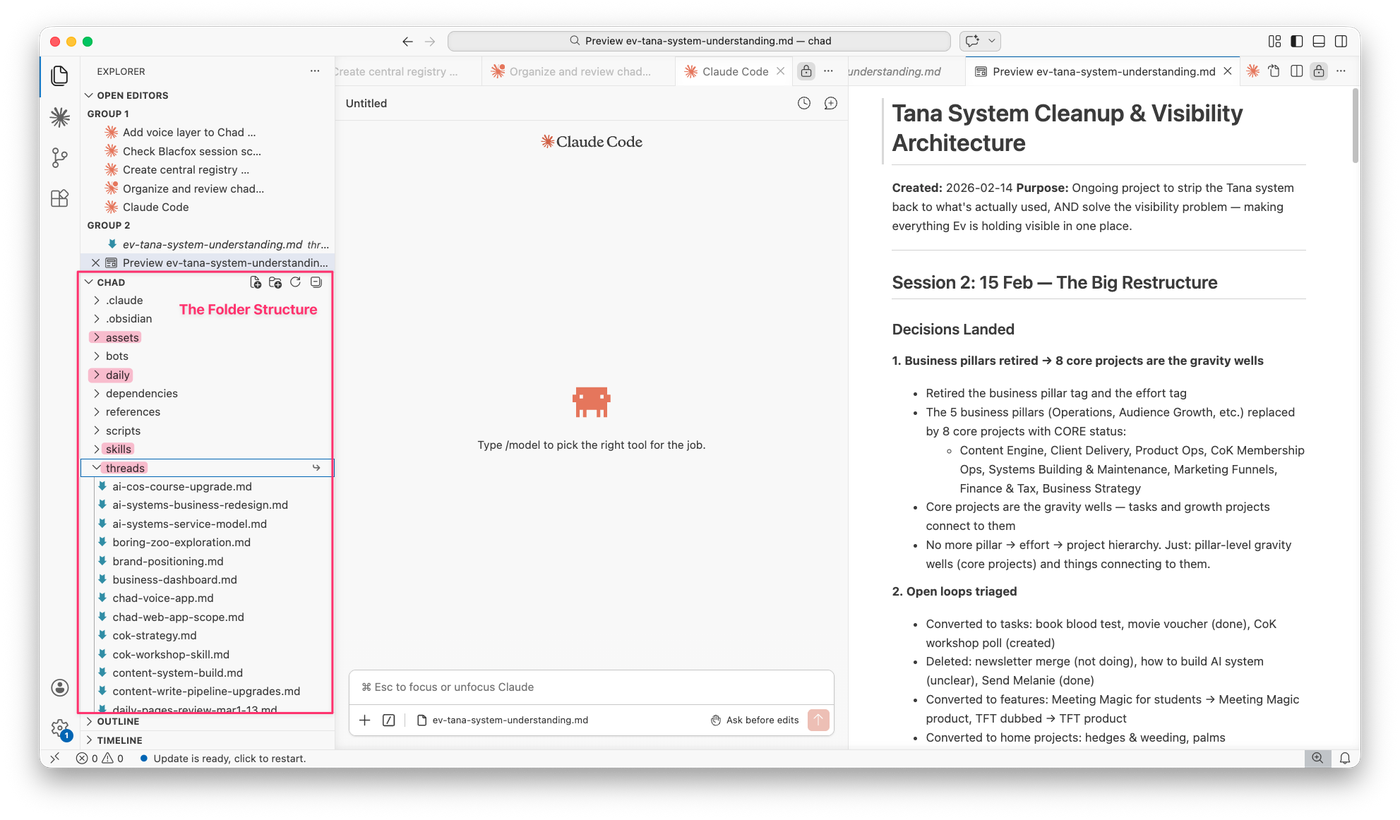
And that’s because Claude Code works from a single folder. That folder lives somewhere on your computer. And within that folder you can build a full interconnected system for your work. Here is how I setup my system:
- Claude.md folder. This is where all of your custom instructions live. Where you tell it who it is, who you are and how it should work with you. This gets loaded into every conversation so it’s where you just load up all that context about yourself. This means that every conversation with Claude starts knowing who you are which is incredibly helpful.
- Skills Folder. This is where all our repeatable workflows live. I’m nearing 50+ skills for all sorts of things that I do in the business.
- Daily Notes. At the end of every conversation I ask Claude to log it in his daily note for that day. This is my way of building a memory system into Claude (I figure if my daily notes help me remember what happened - surely it will help Claude!)
- Threads Folder. These are project files that we keep on everything we work on together. This means I can pick up working with Claude in any conversation and he just checks the thread file and we are up and running.
- Assets Folder. For anything that Claude creates for me (content & other outputs)
With this one interconnected system I never have to explain myself or give extra context. Every conversation is like a continuation of the last.
It knows my business goals, my content calendar, my membership details, what I was working on yesterday. When I say “check the payments,” it already knows which membership, which Stripe account, and what the follow-up process looks like.
How to Setup Claude Code For Your Business (Without Touching a Terminal)
Don’t even think about opening the terminal. I don’t.
I use an app called VS Code with the Claude Code extension installed. That gives you the Claude conversation experience inside a proper app — no terminal required. VS Code also lets you see your folder structure and edit files, so it’s really an all-in-one workspace.
Here’s what I’d do if you want to get started:
1. Download VS Code and install the Claude Code extension. You need a Claude Pro or Max subscription (I use Max for more usage). The extension walks you through setup.
(you can also use Claude Code directly in the Claude app, but I prefer VS code because I have access to all the files + I can have multiple chats open at a time)
2. Set up your directory. This is your AI’s home base. You can literally ask Claude to do this for you. Try something like:
“Set up a working directory for us. I want a CLAUDE.md file with instructions about me and my business, a skills folder for repeatable workflows, a daily notes folder for session logs, and a threads folder for ongoing projects.”
Then tell Claude about your business — what you do, what tools you use, your main workflows. It writes the CLAUDE.md file and you’re off.
3. Start connecting your tools. Think about the tools you use everyday in your business and start asking Claude to connect them. I would start with email & calendar. Just start by saying is there an MCP we can connect?
4. Import any skills you have. If you’ve already built skills in Claude Desktop, ask Claude to transfer them into your new Claude Code directory so you can use them here.
I didn’t get into business to spend my mornings chasing overdue payments and formatting newsletters. I got into it to do the work that actually matters — the thinking, the teaching, the creating.
Claude Code gave me that back. Not by being smarter than other AI. By being the first AI that actually does the work alongside me.
If you’re a business owner still doing everything yourself — I highly recommend learning Claude Code. Once you do I’m pretty convinced you’ll be hooked.
— Ev
PS. If you want to get more out of your AI systems I’ve got two new things I’m launching that might help:
- I’m building a course called Build Your Personal AI Operating System — where we go beyond prompting chatbots and build an all-in-one AI system that can actually operate and support you in your business & work. Founding members get early access and early pricing. So join the waitlist to be first in line.
- Yesterday I hosted a workshop called Think With AI where I showed my exact system for working alongside AI every day to get REAL work done. If you weren’t able to make it in person - I have made it available as an evergreen workshop.

Comments